
Quick answer
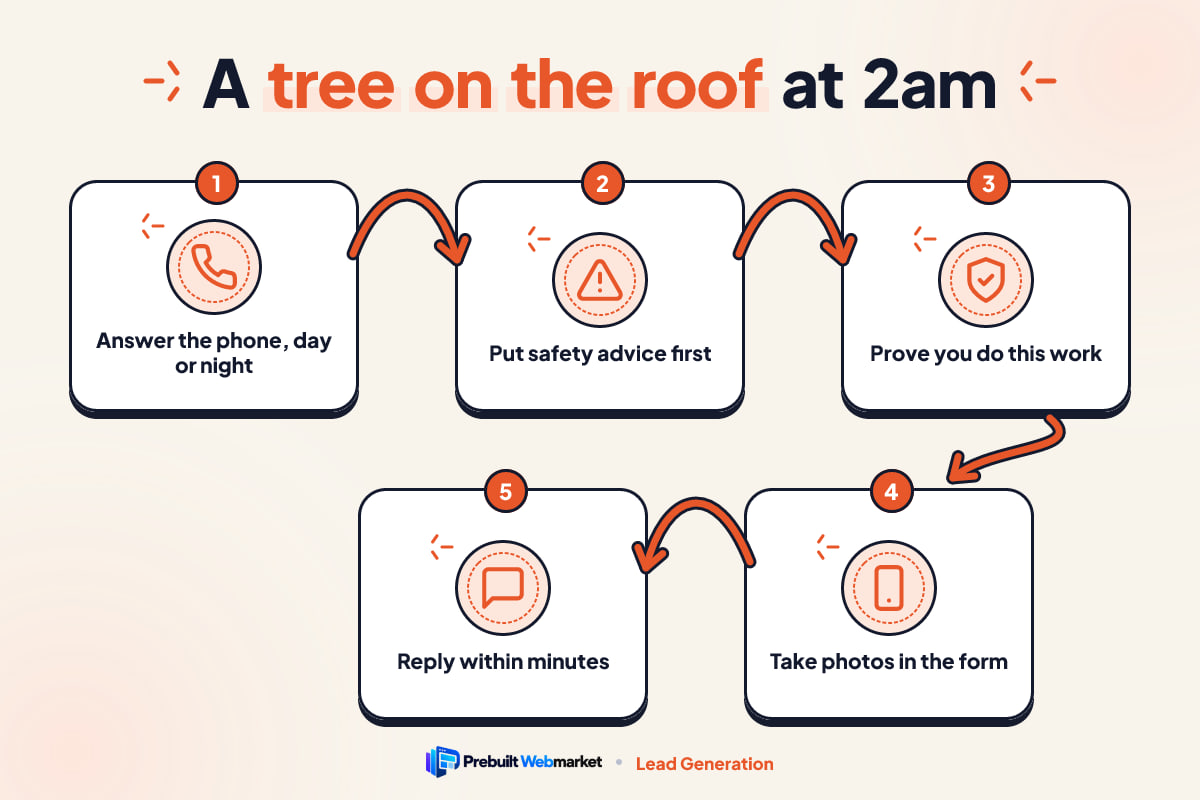
An emergency tree removal website has to work for a scared person on a phone in the dark. Put a tap-to-call number that is really answered at the top, give short safety advice about downed lines before any sales copy, show proof you handle trees on houses, take photos through a short form, reply within minutes and explain what happens with the insurer.
Key takeaways
- The emergency visitor is on a phone, at night, and frightened. Every decision on the page should be judged from that position.
- A phone number only counts if someone answers it. If nobody does at 2am, say what happens instead and make it happen.
- Safety advice about power lines and leaving the house is the first thing that builds trust, not the last thing on the page.
- Homeowners compare two or three tabs in minutes. Proof of tree-on-house work, insurance and crane access decides it.
- The work after the form, the reply, the arrival time and the paperwork for the insurer, is part of the website journey too.
In this article
- Meet Dana, a hypothetical homeowner
- The search
- The first five seconds on the page
- Safety advice before sales copy
- Comparing you with the other tabs
- Making contact
- What happens after they press send
- The insurance conversation
- Morning: the crew arrives
- What to leave off the emergency page
- Fixing your emergency tree removal website
- Your next step
- Frequently asked questions
An emergency tree removal website has one job at 2am: get a frightened homeowner, on a phone, in the dark, safely through to a person who can help. That means a number they can tap that is actually answered, a few lines of safety advice before any sales copy, quick proof that you handle trees on houses, a short way to send photos, and a reply that arrives in minutes.
Tree work is unusual because the most valuable calls arrive at the worst possible moment for a website. Nobody browses at leisure with a limb through the bedroom ceiling. To show what that means in practice, this article follows one hypothetical homeowner through a single bad night, step by step, and stops at each point where most tree service websites lose the job.
Meet Dana, a hypothetical homeowner
Dana is not a real customer; they are an illustrative composite of the storm calls tree crews describe, built to make each step of the journey concrete. Dana lives in a two-storey house with a large oak in the back garden. A line of thunderstorms comes through after midnight. At about 1:50am there is a crack, a thud that shakes the house, and the sound of rain where rain should not be.
Dana is in the upstairs hallway in the dark. The power is out, a main limb or the whole tree is across the back of the roof, and water is dripping into the spare room. Their phone has a weak signal and not much battery.
What Dana is thinking
Dana is not thinking about websites. They are thinking: is the house safe, is anyone hurt, is that a power line in the garden, who can come tonight, and how much is this going to cost. Every one of those worries shows up again later in the journey, and your website will either answer it or send Dana to the next company.
Why this journey is worth designing for
Emergency jobs are rarely the bulk of a tree company’s calendar, but they tend to be large jobs, and the homeowner who trusted you at 2am is likely to call you again for the stump and the remaining trees. Our complete guide to tree service websites covers the planned-work side of the site; this article stays on the night itself.
The search
The search happens on a phone, in a panic, with short and blunt words. Dana does not type “certified arborist hazard mitigation”. They type “tree fell on house emergency”, “emergency tree removal near me” or “tree on roof 24 hour”. Some will say it out loud to a voice assistant with the phone held away from their face.
What the results page has to show
Before Dana reaches any website, the results page has already made a short list. Your business name, the fact that you do emergency work, your hours and your phone number all need to be visible and consistent in your Google Business Profile and on your site. If your profile says you close at 5pm, Dana will skip you, even if your website says 24/7. The mismatch looks careless at exactly the moment the homeowner wants someone careful.
Our tree service website SEO playbook explains how the profile, service pages and town pages work together. For the emergency journey, three things matter most:
- A dedicated emergency page, not a sentence buried on the home page. It gives search engines and AI assistants one clear page to show for storm searches.
- Honest hours everywhere. If your phone is answered overnight, say so in the profile, the header and the emergency page. If it is not, do not claim it.
- A page title that says what the page is, such as “Emergency Tree Removal, 24 Hours” followed by your area, so the result itself answers Dana’s question.
Where most tree service websites lose Dana
Most tree company sites lose the emergency searcher before the click. The emergency service is mentioned only as a bullet in a list of services, the hours say “Mon to Fri 7 to 5”, and the result offers nothing that says “we come out at night”. Dana picks the competitor whose result does.
The first five seconds on the page
The first five seconds decide whether Dana stays, and in those seconds they need to see a phone number and the word emergency. Dana taps your result. The page loads slowly on one bar of signal. Whatever appears first is all they will judge you on.
The number at the top, as a real button
The phone number should be the first readable thing on the screen, set as a large button rather than plain text. MDN’s documentation on linking to telephone numbers with tel: links explains that on cellular devices a tel: link dials the number, which is exactly what Dana needs: one tap, no copying digits with shaking hands.
Size matters too. The W3C’s guidance on minimum target size in WCAG 2.2 sets a floor of 24 by 24 CSS pixels for tap targets, and encourages larger targets for important controls. Treat 24 pixels as the bare minimum for your call button, not the goal. A wide, thumb-sized button that stays fixed at the top or bottom of the screen as Dana scrolls is far better.
One sentence that says you do this
Under the button, one plain sentence: “Tree on your house or blocking your driveway? We answer emergency calls 24 hours a day, 7 days a week, across [your service area].” Only write that if it is true. If your overnight cover is an answering service or an on-call owner, say so in words that set the right expectation.
What should not be in the first screen
A slideshow of drone shots, a cookie banner covering the button, a pop-up offering 10% off pruning, or a hero video that has to load before anything else. Each one adds weight and delay to a page Dana is opening on a weak signal, and each one stands between them and the call.
Safety advice before sales copy
Safety advice is the first thing on the page that earns Dana’s trust, and it belongs near the top, before any description of your services. A company that tells you how to stay safe before it asks for your business sounds like professionals. A company that skips straight to “call now for a free quote” sounds like it wants the job more than it cares about the family inside.
What the safety block should say
Keep it short, practical and general. Four or five lines Dana can read in ten seconds:
- Stay away from any downed wire. Assume every line on the ground or touching the tree is live. Keep everyone and pets well back and call your electricity provider or 911.
- Get people out of damaged rooms. If a limb has come through the roof or a ceiling is sagging, move everyone to another part of the house, or outside if the structure feels unsafe.
- If you smell gas, leave. Get out first, then call the gas utility or 911 from a safe distance.
- Do not cut or climb. A tree resting on a house is under tension and can shift when any part is cut. Leave it to a trained crew.
- Photograph the damage if it is safe to do so. Pictures from outside and inside help both the crew and the insurer later.
Write it in your own words and check it against your local utility’s advice.
Why lines change the job
Your website should also say plainly what happens when a tree is tangled with power lines: the utility must make the line safe before your crew can work on that part of the tree. Explaining this early stops Dana from feeling abandoned when your crew arrives, assesses the scene and waits for the utility truck. It also shows you know how these jobs really run.
Comparing you with the other tabs
Dana will compare you with two or three other companies in a couple of minutes, and the decision rests on whether you look able to do this specific job tonight. Even in a panic, people open a few results. While waiting for a call to connect, or after reaching voicemail, they flick between tabs. They are not reading; they are scanning for reasons to trust or reject.
Proof that you handle trees on houses
Photos of your crew removing a tree from a roof, with a crane or a climber and rigging, do more than any paragraph. One short caption per photo, written as fact: “Oak limb removed from a two-storey roof, tarp fitted the same night.” If you have a crane or work with a crane partner, say so; Dana may not know what is needed, but they recognise heavy equipment when they see it.
The StormReady Tree Service demo from Tampa is a good example of how this can look on a phone: storm response is the first thing on the page, the call button is always in reach, and the emergency content is not hidden behind the general services list.
Insurance, credentials and who is coming
Dana needs to believe that if something goes wrong on the roof, it will not become their problem. Show that you carry liability insurance and workers’ compensation cover where it applies, and offer to send certificates on request. If you have ISA Certified Arborists on staff, name them. Requirements for licensing and insurance differ by state and city, so state what you actually hold and check the local rules before you publish any claim.
A short “who is coming” block helps too: a photo of the crew lead and the trucks people will see in the driveway.
Where pricing fits in the comparison
Dana is afraid of a blank cheque. You do not need to publish emergency prices, which rarely work for jobs this variable, but you should explain what affects the cost: the size of the tree, whether it is on the structure, access for a crane, whether lines are involved, and whether the call-out is at night. Say whether you charge an emergency call-out or night rate. Say that you give a written estimate before major work, except for urgent steps to stop further damage, and describe those steps.
Making contact
Making contact is where most tree service websites lose the emergency job, usually not because the button is missing but because nobody answers it. Dana taps the call button. What happens in the next thirty seconds matters more than everything on the page.
When the call is answered
If a person answers, the website has done its work. If it already told Dana to keep away from lines and photograph the damage, the call that follows is quicker and calmer.
When the call goes to voicemail
If the call goes to voicemail, Dana hangs up and taps the next tab. Most homeowners will not leave a message at 2am; they want a person. This is why an honest 24/7 claim matters so much: the gap between what the page promised and what happened on the phone is where trust breaks.
You have three honest options if you cannot answer every overnight call yourself:
- An answering service that takes the details, tells the homeowner when a crew lead will call back and passes the job on immediately.
- An on-call rota across the owner and crew leads, with calls forwarded to whoever is on that night.
- A missed-call text back: an automatic text the moment a call goes unanswered, saying you have the number, giving the safety lines again and stating when someone will call.
Whatever you choose, describe it on the emergency page. “Overnight calls are answered by our on-call crew lead” is believable. “24/7 emergency service” with a voicemail box is not.
The form for when they cannot talk
Next to the call button, offer a short form for people who cannot talk, keep losing signal or keep getting voicemail. It should ask for very little:
- Name
- Phone number
- Address of the property
- A short description (“Oak on roof, water coming in, no lines down that we can see”)
- Photos
MDN’s page on the tel input type for phone numbers notes that it lets mobile browsers show a keypad designed for entering phone numbers. Use it for the phone field. MDN’s reference on the autocomplete attribute lists values such as tel and street-address, which let the phone fill in Dana’s details instead of making them type an address with cold fingers.
Photos straight from the camera
The photo field is the most useful thing on the form. MDN’s documentation on the capture attribute for file inputs explains that it can ask the phone to open the outward-facing camera for a new picture. In practice, many sites leave capture off so people can also pick photos they have already taken, which suits Dana, who may have photographed the damage before thinking to search. Either way, the field should accept several images and work on a weak connection.
Photos let you judge before anyone drives out whether this needs a crane, a climber, a tarp crew or the utility first.
When the form goes wrong
If Dana misses a field or a photo is too large, the form must say exactly what went wrong. The W3C’s guidance on error identification in WCAG 2.2 says it is not enough to redisplay the form without explaining that the submission failed; the error has to be described in text. “Please add a phone number so we can call you back” is the standard. A form that silently clears itself at 2am is the end of the journey.
What happens after they press send
What happens after Dana presses send is part of the website, even though it happens off the page. The moment the request arrives, three things should happen, and they should happen without anyone remembering to do them.
The thank-you screen
The screen after the form should not just say “Thanks for your message”. It should say what happens next and when: “We have your request and photos. Our on-call crew lead will phone you within 15 minutes. If anything changes, call us on [number].” Repeat the most important safety line. Use the time you can actually meet, not the one that sounds best.
The text and the alert
Dana should get a text confirming the request within a minute, with your company name, the expected callback time and the phone number. At the same moment, your on-call person needs an alert that wakes them up: a text or a call, not an email nobody reads until 7am. This is the plumbing between the website and your phone, and it is where many tree companies lose jobs they had already won.
If your current setup sends form entries to an inbox that nobody checks overnight, fix that before you change anything else on the site. Our GoHighLevel CRM setup includes missed-call text-back and instant team alerts, but any reliable system that texts the homeowner and wakes the right person will do the job.
The callback
When your crew lead calls back, they already have the photos and the address, so they can tell Dana what is needed, whether the utility must come first, roughly when a crew can arrive and how the night rate works.
The insurance conversation
Explaining how insurance works with your crew is the part of the journey most tree websites skip, and it is the question Dana asks second, right after “when can you come”. The honest version is short: you cannot say what Dana’s policy covers, but you can make the claim easier.
What your website can say
A short “Working with your insurer” section on the emergency page should cover:
- Call your insurer as soon as you safely can. Their policy and their adjuster decide what is covered, not the tree company.
- What we document for you. Dated photos before, during and after the work, and an itemised invoice that separates emergency steps (removing the tree from the structure, fitting a tarp) from later work (cutting up the trunk, stump grinding).
- What we can do before the adjuster visits. Urgent work to prevent further damage, such as getting weight off the roof and covering the hole, is usually something a homeowner will want done straight away. Tell them to check with their insurer and to keep every receipt.
- Payment. Say plainly how you take payment and whether you can work with an insurer’s process. Do not promise that the insurer will pay you directly unless you have an arrangement in place.
What your website must not say
Avoid “insurance covers this”, “free with insurance”, “we deal with your claim for you” or anything that suggests an outcome only the insurer can decide. These lines sound helpful at 2am and cause trouble when the adjuster disagrees.
Neighbour’s tree, Dana’s roof
Many emergency calls involve a tree from next door. Your page does not need a legal explanation; it only needs to reassure Dana that you will remove the tree from their house regardless of whose it was, and that who pays is a matter for the homeowners and their insurers. One sentence takes that worry off the table.
Morning: the crew arrives
The emergency journey does not end when your crew arrives; it ends when Dana feels the house is safe, the paperwork is ready and they know what comes next. By morning the tree is off the roof, a tarp is fitted and the trunk lies in pieces across the lawn.
The follow-up that wins the rest of the work
Later that day, a short message from you should include the photos, the invoice and a simple list of next steps: cutting up and removing the trunk, grinding the stump, and a look at the other trees on the property. This is where the emergency customer becomes a planned-work customer, and your website’s removal, trimming and stump pages pick up the job.
Asking for the review
When the work is finished and Dana is relieved, ask for a review. A review that mentions “tree on our roof at 2am, they came out within the hour” is exactly what the next Dana will read on your profile. Send the link in a text, not a printed card, and never offer a reward for a positive review.
What to leave off the emergency page
The emergency page works best with less on it, because every extra element competes with the call button and slows the page on a weak signal. Leave these off, or move them to your general pages:
- Long company history. One line on years in business is plenty here; the story belongs on the about page.
- Every service you offer. Pruning, cabling, plant health care and land clearing are good pages, but not on the emergency page.
- Seasonal discounts and coupons. Nobody is shopping for 10% off at 2am, and a coupon makes the page look like an advert.
- Chat widgets that ask questions before connecting. If a chat box opens, it should connect to a person or take the form details, not run through a menu.
- Heavy video. A short clip of your crew lowering a limb with rigging is fine further down the page, but never as the first thing that loads.
- Stock photos of trees. Dana wants to see your crew on a real roof, not a generic sunset forest.
Fixing your emergency tree removal website
Dana’s night reveals the order to fix your emergency tree removal website, and most of the fixes are small. Start at the top of the journey and work down, because a broken step early on means the later steps never get a chance.
A one-evening audit
Do this tonight, on your own phone, outside, on mobile data:
- Search the way Dana would. Type “emergency tree removal near me” and check that your profile shows the right hours and phone number.
- Open your emergency page. Can you see the call button and the word emergency in the first screen, before any scrolling?
- Tap the button. Does it dial straight away? Who answers at this hour? If it is voicemail, decide what will happen instead and write it on the page.
- Read the safety block. Is it there, near the top, in plain words?
- Send the form with two photos. Does it work on a weak signal? Does a mistake show a clear message?
- Time the reply. How long until the homeowner gets a text, and how long until your on-call person is woken?
- Check the thank-you screen. Does it say what happens next and when?
Fix in this order
If several steps fail, fix them in this order: the phone being answered (or an honest alternative), the call button in the first screen, the instant alerts after a form is sent, the safety block, the photo form, then proof and insurance content. A beautiful page that nobody answers loses more jobs than a plain page with a fast, honest response.
If your current site cannot be fixed easily, it may be time to look at options. Our comparison of website options for local businesses sets out when a DIY builder, WordPress, a freelancer, an agency or a prebuilt site makes sense. Our prebuilt tree service website designs already include a 24/7 emergency banner, a photo-upload quote form and insurance and certification blocks, and our plan prices start at $97 a month with $297 setup, launched within 7 business days of receiving your content.
When an emergency page is the wrong focus
Not every tree company should chase storm calls. If you are a small pruning business with no crane access and no overnight cover, a page promising 2am response creates calls you cannot serve. Say instead that you help with storm clean-up during working hours.
Your next step
Do the one-evening audit above on your own phone tonight, and fix the first step that fails. If you would like a second pair of eyes on your emergency page, or want to see how a prebuilt tree service website handles the whole journey, book a free 45-minute call and we will go through it with you.
Sources
- W3C: Understanding WCAG 2.2 Success Criterion 2.5.8 Target Size (Minimum)
- MDN Web Docs: The anchor element (linking to telephone numbers)
- MDN Web Docs: input type="tel"
- MDN Web Docs: HTML attribute: capture
- MDN Web Docs: HTML attribute: autocomplete
- W3C: Understanding WCAG 2.2 Success Criterion 3.3.1 Error Identification
Frequently asked questions
Should my tree service website say we are available 24/7?
Only if it is true. If the phone is answered at any hour, say so plainly in the header and on the emergency page. If it is not, say what actually happens: an answering service, a text back within a set time, or a first call at a stated hour. A 24/7 claim that goes to voicemail at 2am does more damage than an honest overnight message.
What should an emergency tree removal page include?
A tap-to-call number at the top, a few lines of safety advice about downed power lines and leaving a damaged room, what your crew does on an emergency call, photos of real tree-on-house jobs, proof of insurance and any certified arborists on staff, a short form that accepts photos, and a plain explanation of how you work with the homeowner's insurer.
Should I put emergency tree removal prices on my website?
Fixed prices rarely work, because every tree-on-house job differs in size, access, lines and crane needs. Explain what changes the price instead, say whether you charge a call-out or night rate, and promise a written estimate before work starts where the situation allows. Homeowners mainly fear a blank cheque at 2am, so honesty about how pricing works matters more than a number.
Can my website tell homeowners what their insurance will cover?
No. Only the homeowner's insurer can say what their policy covers. Your website can explain what you provide to help a claim, such as dated photos before and after, an itemised invoice and a written description of the work, and suggest the homeowner contact their insurer as soon as they safely can. Avoid any wording that promises a claim will be paid.
Is a photo upload form worth it for emergency tree calls?
Yes, as a second option next to the phone number. Some homeowners cannot talk freely at night, some get voicemail, and a few photos let you judge whether a crane, a lineman or a tarp crew is needed before anyone drives out. Keep it to name, phone, address, a short description and photos.
How fast should we reply to an emergency website enquiry?
Within minutes, even if the only reply is an automatic text confirming you have the request and saying when a person will call. A homeowner with a tree on the roof will keep calling other companies until someone responds, so the first company to make contact often gets the job.